
I Built an AI Agent That Runs Untrusted Code to Find Security Threats
TL;DR
I built safescan, a CLI that clones any GitHub repo into a sandboxed Upstash Box container, lets an AI agent perform both static and dynamic security analysis, and outputs a structured report. The agent reads files, greps for patterns, runs install scripts, and observes what happens. All inside a throwaway environment that gets destroyed when it's done.
Architecture Overview
The npm ecosystem has a malware problem. And it's getting worse.
Sonatype's Q3 2025 report counted 877,522 malicious packages across open-source registries since they started tracking. In Q2 alone, they found 16,279 new malicious packages, a 188% surge over the same period last year.
These aren't theoretical risks. In September 2025, a self-replicating
worm called Shai-Hulud
infiltrated over 500 npm packages,
stole developer credentials, and used those credentials to propagate to
even more packages. CISA issued a formal alert. That same month, 20
packages including chalk and debug were
hijacked through a phishing attack,
compromising packages with over 2 billion weekly downloads combined.
The scariest part? Many of these attacks are invisible to static analysis.
Attackers use
steganographic payloads hidden in PNG pixel data,
multi-layer obfuscation that splits commands across hundreds of variables,
and runtime code fetching from remote servers. The malicious payload never
exists in the published source. npm audit finds nothing.
Grep finds nothing. The code only reveals itself when it runs.
So I asked a simple question: what if you could safely run untrusted code, and let an AI agent watch what happens?
The idea behind safescan
Most security scanners work by reading code. They pattern-match against
known bad signatures: eval(), suspicious URLs, encoded
strings. That catches the obvious stuff. But the sophisticated attacks
happen at install time, when a postinstall script downloads
a payload, decodes it, and exfiltrates your .env file. None
of that shows up in a static scan.
safescan does both. It clones a repo into an isolated container, runs static analysis first, then actually executes the install step and observes what changes. An AI agent handles the entire process autonomously: reading files, running commands, reasoning about what it finds.
The key ingredient is Upstash Box. It gave me sandboxed containers with a built-in AI agent in a single API call. No Docker setup, no container orchestration, no agent framework wiring.
Why Upstash Box is a good fit for this
Before diving into the code, here's why I picked Upstash Box for this project:
True isolation
Each box is a Docker container with its own filesystem, processes, and network stack. Code inside can't reach anything outside. You can run the sketchiest package on earth and it can't touch your machine.
Built-in AI agent
Attach a Codex or Claude agent that can read files, run bash, use git, grep, and glob. All autonomously inside the container. No need to wire up an agent framework yourself.
Ephemeral by design
One call to box.delete() and everything is gone. Whatever
the repo tried to do (write files, spawn processes, phone home) none
of it persists.
Pay-per-use economics
CPU is billed only during active execution. A typical scan costs fractions of a cent in compute. Idle boxes cost almost nothing.
Spinning up the sandbox
The first thing safescan does is create a box with an OpenAI Codex agent attached:
const box = await Box.create({
  runtime: "node",
  agent: {
    runner: Agent.Codex,
    model: OpenAICodex.GPT_5_3_Codex,
    apiKey: process.env.OPENAI_API_KEY!,
  },
});
One call. A fresh Alpine Linux container with 2 vCPU, 2GB RAM, 10GB disk, and an AI agent ready to go.
Clone and let the agent loose
Next, clone the target repo and hand it off to the agent with a security audit prompt:
await box.git.clone({ repo: repoUrl });

const stream = await box.agent.stream({
  prompt: SCAN_PROMPT,
  timeout: 300_000,
  onToolUse(tool) {
    logTool(tool.name, tool.input);
  },
});
I used stream() instead of run() here. This
was a deliberate choice. With streaming, I can watch the agent work in
real-time through the onToolUse callback. Every time the
agent reads a file, runs a command, or greps for a pattern, I see it.
The scan isn't a black box.
The agent performs two phases:
Phase 1: Static analysis
The agent scans for known patterns: obfuscated code,
eval(), exec(),
Function() constructors. It checks
postinstall and preinstall scripts. It
looks for environment variable harvesting, hardcoded network calls
to unknown endpoints, filesystem access outside the project
directory, crypto mining patterns, reverse shells, and typosquatting
in dependency names. It also examines GitHub Actions workflows for
supply chain risks.
Phase 2: Dynamic analysis
This is where sandboxing really matters. The agent actually runs
npm install (or pip install,
go mod download) and observes what happens. It checks
what files were created or modified after install. It looks at
network-related code that runs on import.
Some packages only do malicious things at install time. A
postinstall script that curls a remote endpoint and
pipes the response to sh won't show up in any static
scan. Inside the box, the agent can just run it and see what happens.
That single capability is what makes this approach different from
tools like npm audit or Snyk.
Watching the agent work
This is the part that made me appreciate the stream() API.
I set up tool icons so each agent action gets a clean log line:
const TOOL_ICONS: Record<string, string> = {
  Read: "📄",
  Write: "✏️",
  Bash: "⚡",
  Glob: "🔍",
  Grep: "🔎",
};

function logTool(name: string, input: Record<string, unknown>) {
  const icon = TOOL_ICONS[name] || "🔧";
  let detail = "";

  if (name === "Bash" && input.command) {
    detail = ` $ ${input.command}`;
  } else if (name === "Read" && input.file_path) {
    detail = ` ${input.file_path}`;
  } else if (name === "Grep" && input.pattern) {
    detail = ` /${input.pattern}/`;
  }

  console.log(`  ${icon} ${name}${detail}`);
}
Then consume the stream and show reasoning progress:
for await (const chunk of stream) {
  if (chunk.type === "reasoning") {
    process.stdout.write(".");
  }
}
In the terminal, you see the agent thinking and acting. Reading
package.json, globbing for shell scripts, grepping for
eval(, running npm install, inspecting what
changed. You know exactly what the agent is doing at every step.
The prompt that makes or breaks it
The security audit prompt is the core of the whole thing. Here's what I send to the agent:
const SCAN_PROMPT = `You are a security auditor. Analyze the cloned
repository in /work for security risks.

PHASE 1 — Static Analysis:
- Check for obfuscated code, base64-encoded strings, eval(), exec(),
  Function() constructors
- Inspect install hooks: postinstall, preinstall, prepare scripts
  in package.json, setup.py, Makefile, etc.
- Look for environment variable harvesting (process.env, os.environ)
- Detect suspicious network calls (fetch, http, axios, requests)
  to hardcoded external URLs
- Check for filesystem access outside the project directory
- Identify minified or bundled files that could hide malicious intent
- Look for crypto mining patterns, reverse shells, data exfiltration
- Check for typosquatting in dependency names
- Examine GitHub Actions workflows for supply chain risks

PHASE 2 — Dynamic Analysis:
- Run the install step (npm install / pip install / go mod download)
  and observe what happens
- Check what files were created or modified after install
- Look at any network-related code that runs on import or install

IMPORTANT: After your analysis, output your final result as a single
JSON block:
{
  "riskLevel": "safe" | "warning" | "dangerous",
  "summary": "one-line summary of what you found",
  "findings": [
    {
      "severity": "HIGH" | "MEDIUM" | "LOW",
      "title": "short description of the issue",
      "location": "file/path:line",
      "detail": "A detailed explanation of the vulnerability..."
    }
  ]
}

Be specific about file paths and line numbers.
If the repo looks clean, return riskLevel "safe" with empty findings.
Only flag real, concrete issues — not hypothetical ones.`;
That last line is a hard-won lesson. Without "only flag real, concrete issues," the agent over-reports everything. It flags every theoretical risk it can imagine: "this package could be used maliciously," "this function could leak data if called with the wrong arguments." The signal-to-noise ratio tanks. Telling the agent to stick to concrete, observed issues was the single biggest improvement to output quality.
Structured output and the report
After the stream completes, I parse the agent's output into a typed report:
interface Finding {
  severity: "HIGH" | "MEDIUM" | "LOW";
  title: string;
  location: string;
  detail: string;
}

interface ScanReport {
  riskLevel: "safe" | "warning" | "dangerous";
  summary: string;
  findings: Finding[];
  cost?: { totalUsd: number; computeMs: number };
}
Each finding includes a detail field with a 2-4 sentence
explanation of what the code does, why it's dangerous, how it could be
exploited, and the recommended fix. The agent writes these because it
actually read and understood the code, not because it matched a regex.
The report renders in the terminal with color-coded severity and gets saved as a Markdown file you can share with your team or attach to a PR:
const slug = repoSlug(repoUrl);
const filename = `safescan-${slug}-${Date.now()}.md`;
const md = generateMarkdown(repoUrl, report);
await Bun.write(filename, md);
Destroy the box
No matter what happens (success, failure, timeout) the box gets destroyed:
try {
  // ... scan logic
} finally {
  await box.delete();
}
Whatever the repo tried to do, it's gone. No cleanup scripts, no leftover containers, no dangling processes.
Demo
Here's what a scan looks like in action. I pointed safescan at a real PHP repository and let the agent do its thing:
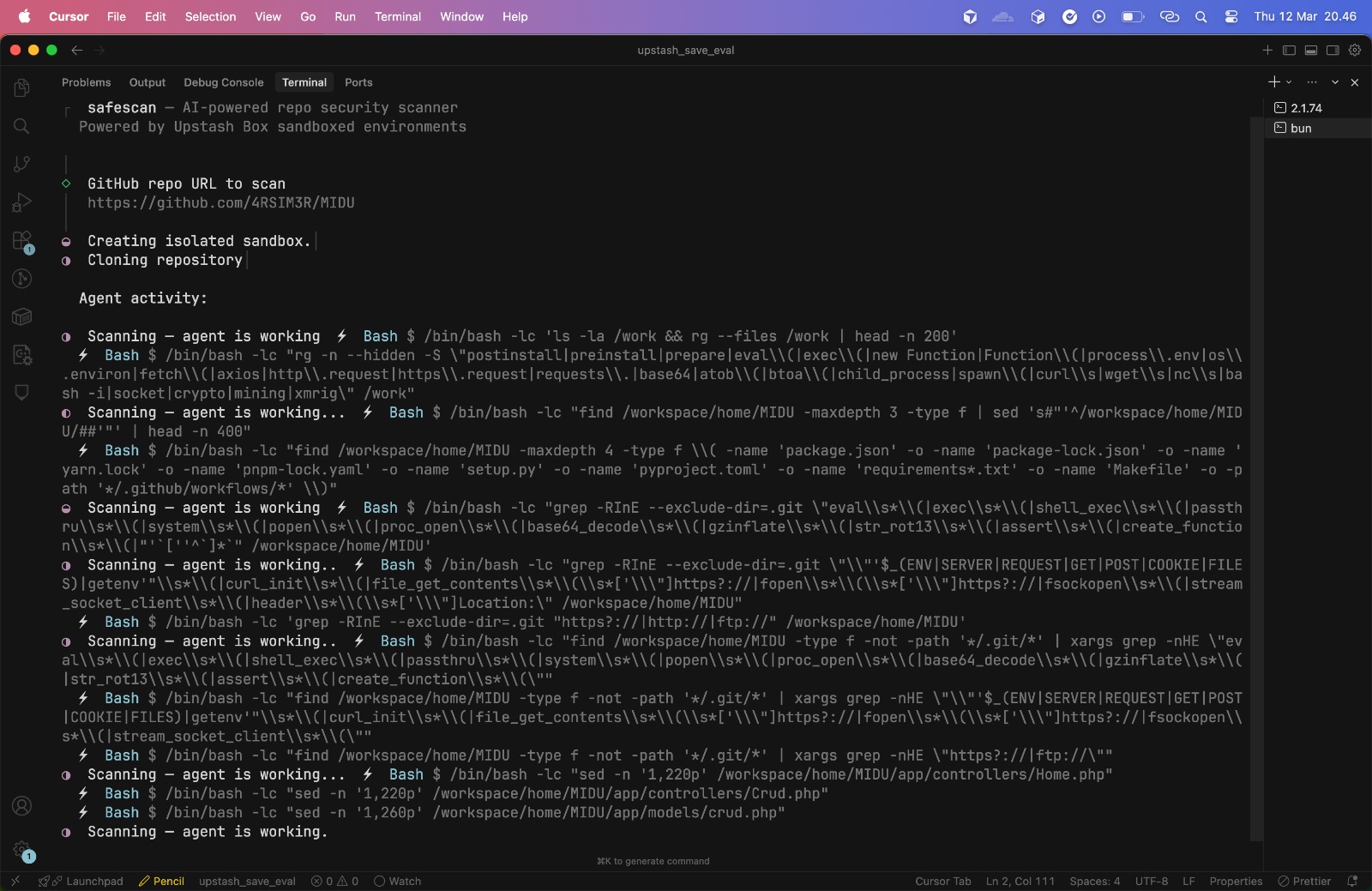
The scan completed in about 80 seconds. You can see the full generated report here, complete with severity badges, file locations, and detailed explanations for each finding.
Try it yourself
# Clone the repo
git clone https://github.com/njiplak/upstash-box-poc.git
cd upstash-box-poc

# Install dependencies
bun install

# Set your API keys
cp .env.example .env
# Edit .env with your keys:
#   UPSTASH_BOX_API_KEY=abx_...
#   OPENAI_API_KEY=sk-...

# Run
bun run index.ts
You'll need:
- An Upstash account with a Box API key. See the Upstash Box quickstart for setup.
- An OpenAI API key for the Codex agent.
Full source code: github.com/njiplak/upstash-box-poc
What I learned
Building safescan taught me three things worth sharing:
Dynamic analysis catches what static analysis misses
This isn't a new insight for security researchers, but experiencing
it firsthand made it visceral. A postinstall script
that downloads a payload from a remote server and executes it leaves
zero trace in the source code. You have to run it to see it.
Sandboxed containers make that safe to do.
AI agents need constraints, not just capabilities
The biggest quality improvement came from a single line in the prompt: "Only flag real, concrete issues." Without it, the agent produced exhaustive reports full of hypothetical risks that drowned out actual findings. More capability without better constraints produces noise, not signal.
The building blocks for autonomous security tooling are here
Upstash Box handled the hard parts: container isolation, agent tool
calling, ephemeral environments. I wrote the prompt and the CLI
around it. The pieces are there for something bigger: CI/CD
integration that scans every new dependency before it enters your
lockfile, batch scanning with Promise.all() across
multiple boxes, multi-model comparison where you spin up one box
with Claude and another with Codex and compare their findings.
877,000 malicious packages and counting. The tools to fight back are getting better. This is one small piece of that puzzle.
Related Notes
Building something that needs security-conscious architecture?
I help startups make smart infrastructure decisions. Let's talk.
Book an Advisory Session